




Today’s CIOs must manage the fine line between providing the agility and freedom for their business to innovate and empowering new capabilities while still protecting their organisation’s data. As businesses continue to migrate to Microsoft Dynamics 365 (D365) as the platform of choice for CRM and ERP systems, two key themes are emerging: security and integrations.
D365 has evolved into a foundational platform for digital transformation; however, its true value is realised based on its secure configuration and integration with the IT ecosystem at large.
Why Security Matters More Than Ever
In the current landscape of cyber threats and stringent compliance regulations, D365 has a number of security controls for both needs. CIOs should not consider these features as afterthoughts or optional add-ons, but as foundational elements that will help build trust with employees and customers.
Key Security Controls with D365
- Role-Based Access Control (RBAC): D365 allows for granular permission settings, ensuring that users can only access data and functionalities relevant to their job roles, which helps in minimising the attack surface.
- Data Encryption: Data is encrypted both at rest and in transit by default, providing a layer of security that protects sensitive information from interception or unauthorised access.
- Multi-Factor Authentication (MFA): With integration to Microsoft Entra ID (formerly Azure Active Directory), D365 provides options for multi-factor authentication to further secure user identities.
- Advanced Threat Protection: D365 includes tools for monitoring and anomaly detection, enabling CIOs to take proactive measures against suspicious activities within the environment.
In addition to these controls within D365, the Microsoft Cloud itself has a host of security standards, in addition to compliance with global regulations such as ISO 27001, GDPR, and HIPAA, providing a comprehensive and robust infrastructure for any company within a regulated industry.
The key point for CIOs is this: while these security features are set up by default, they need to be configured with a strategy. Yes, it’s the CISO’s role to architect and recommend the right security posture to the CIO. But security architecture is about far more than just applying the settings; it’s about designing a comprehensive approach that fully meets your business needs and mitigates risks.
The Role of Integrations
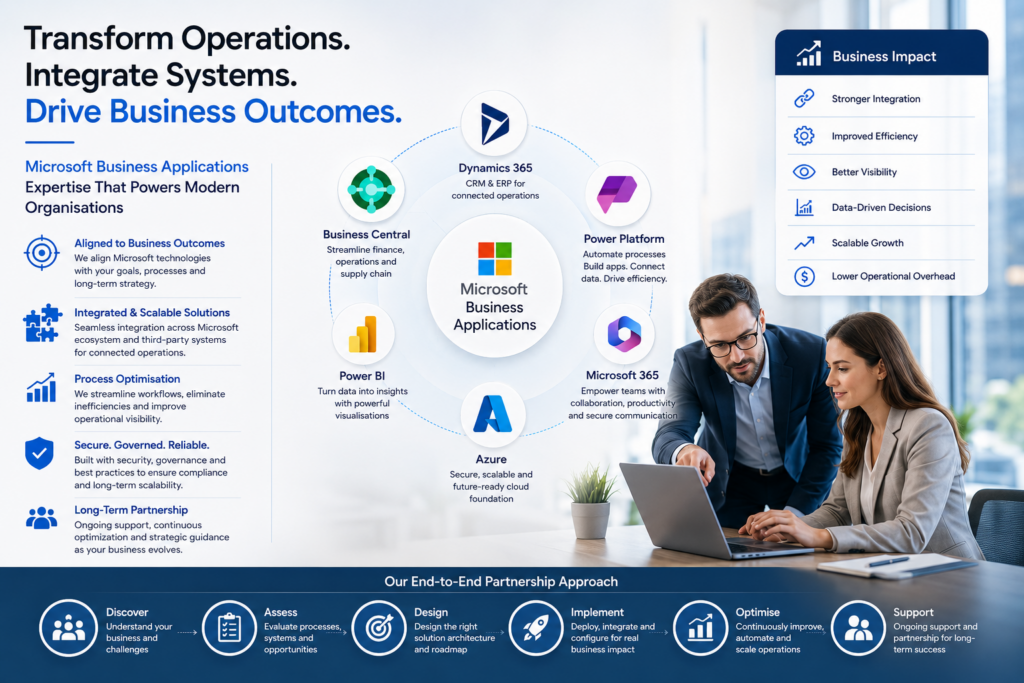
Integration Capabilities: D365’s true potential is realised when it’s part of a broader ecosystem. With its open API and seamless integration with Microsoft 365, Teams, and the Power Platform, D365 encourages a connected digital environment. CIOs should view integrations as a key component of their overall technology strategy.
Microsoft 365 and Teams Integration
Leveraging D365 data and functionalities within collaboration tools like Outlook and Teams can significantly enhance productivity. For instance, sales and service representatives can access and update customer records, review opportunities, and manage tasks directly within Teams, reducing app-switching friction.
Power Platform Enhancements
The Power Platform’s suite of Power Automate, Power Apps, and Power BI, when used with D365, opens up avenues for custom low-code app development, process automation, and sophisticated data visualisation. CIOs can thus enable self-service innovation for business users while offloading some development demands from their limited developer resources.
Third-Party and Industry-Specific Extensions
D365’s compatibility with a vast array of third-party and industry-specific applications, from eCommerce platforms to logistics and supply chain management systems, allows businesses to create a comprehensive and custom-fit digital ecosystem.
CIOs’ integration challenge is not about the feasibility but ensuring that it’s done securely and without inadvertently introducing new weaknesses or inefficiencies.
Balancing Security with Integration
Security and integration are sometimes viewed as opposing priorities: security teams seek to lock down environments, while business leaders push for open data flows and interoperability. For CIOs, the goal is to align both, ensuring integrations are secure, auditable, and compliant.
Best Practices for CIOs
- Adopt a Zero-Trust Model: Every integration point should be validated, authenticated, and monitored. Zero-trust principles minimise risks of lateral attacks across systems.
- Implement Governance Frameworks: Establish clear policies for who can build or approve integrations, ensuring consistency across the organisation.
- Prioritise API Security: With integrations heavily dependent on APIs, secure coding, authentication tokens, and monitoring must be top priorities.
- Leverage Microsoft Defender: Combining D365 with Microsoft Defender for Cloud Apps provides visibility into third-party integrations and potential shadow IT.
By treating integration governance as part of the overall security strategy, CIOs can confidently pursue innovation without compromising resilience.
The Role of Trusted Partners
Even with Microsoft’s extensive documentation and tooling, implementing a secure and fully integrated D365 environment requires deep expertise. This is where collaboration with trusted external specialists can be transformative.
For example, organisations engaging Microsoft Dynamics partners in Australia gain access to local expertise that blends global best practices with regional regulatory knowledge. These partners help CIOs design security-first integration strategies while ensuring deployments remain agile and aligned to business objectives.
Similarly, enlisting experienced dynamics 365 consulting services can streamline complex integration projects, from linking D365 to legacy ERP systems to embedding AI-driven customer insights into everyday operations. For CIOs tasked with both protecting and enabling the business, having skilled partners ensures projects deliver on time, on budget, and with minimal risk.
Looking Ahead
CIOs must continue to meet ongoing challenges in digital ecosystems that are becoming more interconnected than ever before. In the world of D365, they must have a focus on two areas in particular: providing an environment that has security at its core, mitigating against the rising tide of cyber-threats, and making sure all integrations to and from their core systems are tied to real business value.
By implementing security and controls that are already embedded into D365, tightly aligning their D365 integrations with business priorities and outcomes, and by partnering with the right vendor partners, CIOs can turn their Microsoft Dynamics CRM and ERP environments into highly secure, intelligent and future-proofed platforms.
The CIO’s role is no longer just about implementing technology. It’s about setting the stage for a digital enterprise that will innovate securely for years to come. Microsoft Dynamics 365 is the key to that balance.